Visit Yiwu ? Ask The Guide !
Setting Up a New Office in Yiwu: Where and How to Buy Office Computers
Last Updated: July 2026 Reading Time: 18 minutes
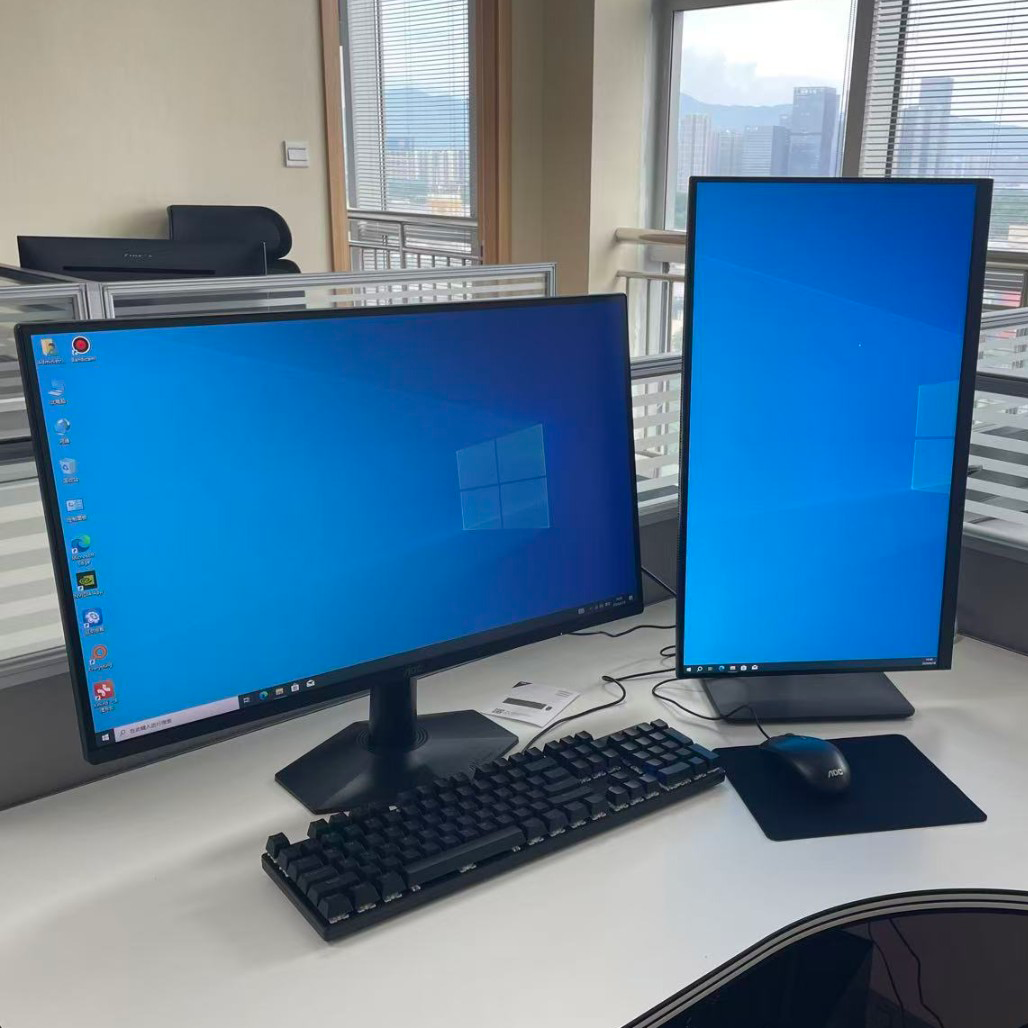
Yiwu Office Setup & IT Deployment Guide (2026): Computer Procurement, Network Configuration, Office Environment Planning, and Real Case Sharing
Suitable for: International companies, trading companies, cross-border e-commerce teams, and entrepreneurs preparing to set up an office in Yiwu
Many international clients who have just arrived in Yiwu ask similar questions when purchasing office computers:
- How much budget should I prepare for a complete office computer setup?
- Is it more cost-effective to buy new or used computers?
- Where can I buy office computers in Yiwu?
- How long does it take from procurement to officially starting office operations?
- If I don't understand computers, who can help me?
In fact, most companies do not lack channels for purchasing computers. The real challenge is how to choose a configuration that suits their business and how to complete procurement, installation, and deployment in the shortest possible time.
From office computer budget planning and procurement channel selection to Windows, Microsoft Office, dual-monitor office environments, and network equipment configuration. Based on the above questions, our actual office setup experience, and the current Chinese computer market, this article introduces the budget range, purchasing channels, equipment selection for office computer procurement in Yiwu, and shares practical suggestions for office computer procurement and IT environment deployment in Yiwu, helping international companies complete new office preparation more efficiently.
Article Summary: Yiwu Office Computer Procurement Process and Real Case Sharing
Step 1: How should I choose office computers in Yiwu?
Step 2: How much budget should I prepare for a complete office computer setup?
Step 3: Where can I buy office computers in Yiwu?
Step 4: How long does it take from procurement to officially starting office operations?
Step 5: If I don't understand computers in Yiwu, who can assist with the entire process?
⭐ Real case sharing from our office
The content of this article is compiled based on the Yiwu market in 2026, our office setup experience, and current enterprise IT deployment practices, and is for reference only. Different companies may have differences in budget, configuration, and procurement methods. It is recommended to plan according to actual business needs.
If You Only Have One Minute
For most companies newly entering Yiwu:
- Budget for a 3-person team: approximately RMB 12,000–30,000
- Most offices can complete deployment within 1–5 days
- For foreign trade teams, 16GB memory is usually sufficient. If the budget allows, it is recommended to choose 32GB memory at once.
- For development, e-commerce, and AI applications, 32GB memory or above is recommended.
- In addition to computers, network, email, printers, and office software should also be planned simultaneously.
- If there is no dedicated IT staff, consider entrusting a local service provider to assist with deployment.
How Should I Choose Office Computers in Yiwu?
Determine Your Business Needs First, Then Choose the Computer Configuration
When purchasing computers, many companies first compare brands, processor models, or even focus only on price.
However, from the perspective of actual use, the first thing that should really be considered is:
What work does your team use computers to complete every day?
Different business scenarios have very different performance requirements for computers.
A configuration that is too high may increase unnecessary procurement costs; a configuration that is too low may affect work efficiency over the next 3–5 years. Therefore, it is recommended to choose the appropriate configuration based on your company's actual business.
Based on the actual usage of Yiwu trading companies, cross-border e-commerce companies, website development teams, and design studios, we have compiled the following common configuration recommendations.
Recommended Configurations for Different Business Types
| Business Type | Recommended Configuration | Typical Application Scenarios |
| Basic office business | Intel Core i5 or AMD Ryzen 5, 16GB memory, 512GB SSD | Office, ERP systems, email, WeCom, web browsing, video conferencing, etc. |
| Foreign trade company | Intel Core i5 / Core Ultra 5 or AMD Ryzen 5, 16GB memory, 1TB SSD (upgradeable to 32GB for multi-account operations) | Google, WhatsApp, AI translation tools, Excel quotations, multiple browsers, multi-account operations, etc. |
| E-commerce operations team | Intel Core i7 or AMD Ryzen 7, 32GB memory, 1TB SSD | Taobao, 1688, Amazon, Shopify, TikTok Shop, image processing, advertising, AI product image creation, etc. |
| Website development team | Intel Core i7 or AMD Ryzen 7 or above, 32GB memory, 1TB SSD | VS Code, Docker, databases, virtual machines, local testing environments, AI programming assistants, etc. |
| Design & video production | Intel Core i7 / Core Ultra 7 or AMD Ryzen 7 or above, 32GB–64GB memory, 1TB SSD or above, RTX 4060 or above graphics card | Photoshop, Illustrator, Premiere Pro, Jianying, Blender, etc. |
| AI applications & data analysis | Core Ultra 7 or AMD Ryzen AI series, 32GB–64GB memory, 1TB–2TB SSD, RTX 4060 or above graphics card | AI image generation, local large language model deployment, data analysis, automated workflows, etc. |
The above configurations are for reference only. The actual selection should be comprehensively evaluated based on company size, number of employees, business system requirements, and future development plans. For companies planning to use AI office tools, data analysis platforms, or professional design software, it is recommended to prioritize configurations with higher memory capacity and larger storage space to achieve a smoother and longer-lasting user experience.
New Computers or Used Computers?
This is one of the most common concerns among startups and international clients.
In fact, there is no absolutely correct answer.
The key depends on the company's development stage, budget, and requirements for stability.
When Is It Suitable to Choose Used Computers?
If your company meets the following conditions:
- Newly established
- Limited budget
- Mainly used for Office work
- Email communication and web browsing
- Planning to gradually upgrade equipment in the future
Then professionally tested enterprise-grade used business computers are usually sufficient to meet your needs.
For example, common models include:
- Dell OptiPlex business series
- Lenovo ThinkCentre business series
- HP EliteDesk business series
These commercial computers offer relatively high stability and are suitable as a transitional solution during the startup stage.
Important Note: It is recommended to prioritize enterprise-grade business models and confirm the hard drive health, memory stability, and complete machine inspection report to reduce the risk of future failures.
When Is It Suitable to Choose New Computers?
If your business involves:
- Website development
- E-commerce operations
- Graphic design
- Video production
- AI tool applications
- Long-term fixed office work
Then new computers are usually a more worthwhile choice.
Although the initial investment is higher, you can obtain:
- Better performance
- Longer service life
- Lower failure rate
- More comprehensive after-sales support
For companies planning long-term development, the overall cost of ownership is often lower.
Quick Selection Recommendations
- Startup stage with a limited budget → Prioritize used business computers
- Planning stable office work for more than 3 years → Prioritize new computers
- E-commerce operations and website development → 32GB memory is recommended
- Design, video editing, and AI applications → A dedicated graphics card is recommended
- Daily office work for foreign trade companies → An i5 + 16GB memory configuration is usually sufficient
- Not sure how to choose → Determine the configuration based on business needs first, then decide between a new or used computer
Instead of buying the most expensive computer, it is better to choose the computer that best suits your company's business development.
Procurement Recommendations
For most Yiwu trading companies and small to medium-sized enterprises, an Intel Core i5 + 16GB memory + 1TB SSD is already sufficient to meet daily office needs over the next 3–5 years.
If your business involves e-commerce operations, website development, video production, or AI tool applications, it is recommended to directly choose a configuration with 32GB memory or above to reduce future upgrade costs and obtain a more stable user experience.
How Much Budget Should You Prepare for a Complete Office Computer Setup?
Budget Reference for a Single Office Computer (Enterprise Procurement Version for the Yiwu Market)
| Office Type | Used Option | New Option |
| Basic office work | RMB 2,000–3,000 | RMB 4,000–5,500 |
| Trading company / Foreign trade enterprise | RMB 3,000–5,000 | RMB 5,500–8,000 |
| E-commerce operations team | RMB 4,500–7,000 | RMB 7,000–10,000 |
| Website development team | RMB 5,000–8,000 | RMB 8,500–13,000 |
| Design & video production | RMB 8,000–15,000 | RMB 12,000–18,000+ |
| AI applications & data analysis | RMB 10,000–18,000 | RMB 15,000–25,000+ |
Budget Notes:
The above budgets usually include the computer, monitor, keyboard and mouse, and basic operating system installation. If genuine Microsoft Office (or Microsoft 365), professional design software, server equipment, or specialized industry software is required, the budget may increase further.
When preparing a budget, many companies tend to focus only on the price of the computer itself while overlooking other necessary costs.
In fact, a complete office environment usually also includes:
- Monitor
- Keyboard and mouse
- Windows
- Microsoft Office or Microsoft 365
- Network equipment
- Printing equipment
- Data backup solution
Therefore, even if two computers have the same purchase price, their total cost after being put into use may differ significantly.
For enterprise procurement, it is recommended to focus more on the overall cost of ownership rather than only the hardware purchase price.
Team Budget Reference
| Company Size | Basic Office | Foreign Trade Enterprise | E-commerce Operations | Development Team |
| 3-person team | RMB 12,000–15,600 | RMB 15,600–24,000 | RMB 21,000–30,000 | RMB 25,500–39,000 |
| 5-person team | RMB 20,000–27,500 | RMB 27,500–40,000 | RMB 35,000–50,000 | RMB 42,000–65,000 |
| 10-person team | RMB 40,000–55,000 | RMB 55,000–80,000 | RMB 70,000–100,000 | RMB 85,000–130,000 |
| 20-person team | RMB 80,000–110,000 | RMB 110,000–160,000 | RMB 140,000–200,000 | RMB 170,000–260,000 |
Note: Due to significant differences in graphics card, memory, and software licensing requirements, budgets for Design & Video Production teams and AI Applications & Data Analysis teams are recommended to be calculated separately based on actual project requirements.
Procurement Recommendations
When purchasing computers, companies are advised to comprehensively consider the equipment lifecycle, future maintenance costs, and future business expansion requirements rather than focusing only on the initial purchase price.
The above prices are reference ranges for enterprise procurement in the Yiwu market. Actual costs may vary depending on brand, configuration, purchase quantity, software licensing, and after-sales service plans.
For companies planning long-term development, it is recommended to make unified planning based on business needs over the next 3–5 years. Reserving appropriate performance upgrade capacity is usually more cost-effective than frequently replacing or upgrading equipment later.
Where to Buy Office Computers in Yiwu
After determining your configuration requirements and budget range, the next thing to consider is the procurement channel.
Different procurement channels differ significantly in terms of price, delivery speed, after-sales service, and subsequent maintenance.
For local Yiwu companies and international clients, choosing the right procurement method is often more important than simply comparing computer prices.
The following are the most common methods currently used by companies to purchase office computers:
| Procurement Method | Price Advantage | Delivery Speed | After-sales Support |
|---|---|---|---|
| Local computer stores | Medium | ★★★★★ | ★★★★☆ |
| JD.com (Jingdong) | Good | ★★★★☆ | ★★★★★ |
| Taobao | Most flexible | ★★★☆☆ | ★★★☆☆ |
| Used business computers | Lowest cost | ★★★☆☆ | ★★☆☆☆ |
| IT service provider assistance | Best overall | ★★★★★ | ★★★★★ |
There is no absolutely best procurement method. The key depends on the company's current stage of development, budget, and requirements for ongoing support.
Common Office Computer Procurement Channels in Yiwu
Option 1: Purchase from Local Computer Stores
If your goal is to start office operations as quickly as possible, local computer stores are usually the fastest choice.
Most merchants can recommend configurations based on your needs and provide assembly, operating system installation, and basic setup services.
For companies that need to put an office into operation urgently, it usually takes only 1–2 days from confirming the configuration to delivery.
This method is suitable for:
- Prefer face-to-face communication
- Need fast delivery
- Require on-site installation services
- Need customized assembled computers
- Want to purchase monitors, printers, and other office equipment at the same time
Advantages:
- Fast delivery
- Configuration can be confirmed on-site
- Higher communication efficiency
- Convenient for future maintenance and upgrades
Things to Note:
- Quotations may vary significantly between different merchants
- Configuration plans may differ even under the same budget
- It is recommended to request a detailed configuration list and quotation
- It is recommended to compare at least 2–3 suppliers before making a decision
Option 2: Purchase Office Computers Through JD.com (Jingdong) or Taobao
More and more companies are choosing to purchase office equipment through JD.com (Jingdong) or Taobao.
Compared with physical stores, online platforms usually offer a wider selection of models and more transparent pricing.
If you already know exactly what configuration you need, online purchasing can usually provide better value for money.
This method is suitable for:
- Already know the required configuration
- Want to compare prices across different brands
- No need for same-day delivery
- Need to purchase multiple devices
- Want standardized products and official invoices
Advantages of Purchasing Through JD.com (Jingdong):
- More official flagship stores
- More comprehensive after-sales service system
- More standardized enterprise procurement process
- Faster delivery
Advantages of Purchasing Through Taobao:
- Wider product selection
- More customized assembly options
- Greater pricing flexibility
- Easier to find special configuration requirements
Things to Note:
- The large number of models may make selection more difficult
- Some configuration differences are not easy to identify
- It is recommended to prioritize merchants with good reputations and stable reviews
- Confirm after-sales service and warranty policies before placing an order
For international clients unfamiliar with the Chinese computer market, comparing specifications alone is often not enough to determine which solution is more suitable for their business needs.
Option 3: Purchase Enterprise-Grade Used Business Computers Through Platforms Such as Xianyu and Zhuanzhuan
For newly established companies, enterprise-grade used business computers are an important choice for many startup teams.
Unlike ordinary consumer computers, business-series products are usually designed for long-term enterprise office use and generally perform better in terms of stability and durability.
Common models include:
- Dell OptiPlex Business Series
- Lenovo ThinkCentre Business Series
- HP EliteDesk Business Series
Even as used equipment, they are still capable of handling:
- Office work
- Email communication
- Web browsing
- WeCom
- ERP systems
- Daily office work for foreign trade companies
For companies wishing to control startup costs, this is usually a relatively balanced solution between budget and stability.
This method is suitable for:
- Startup teams
- Companies with limited budgets
- Temporary project teams
- Basic office needs
Things to Note:
- Prioritize enterprise-grade business models
- Confirm hard drive health and memory stability
- Request a complete machine inspection report
- Confirm the equipment source and years of use
- Understand the warranty and after-sales policy in advance
It should be noted that most used equipment sold by individual sellers usually does not provide long-term after-sales service, while some professional used equipment dealers may provide warranties ranging from 7 days to 1 year. Therefore, before purchasing, special attention should be paid to equipment quality and after-sales support.
Option 4: Entrust a Professional IT Service Provider to Assist with Procurement and Deployment
For many international companies that have just entered the Chinese market, what truly consumes time is often not purchasing the computers themselves, but the entire procurement and deployment process.
For example:
- Which supplier is more reliable?
- Is the current quotation reasonable?
- Does the configuration meet business requirements?
- How should Windows and Microsoft Office be installed?
- How should a dual-monitor office environment be set up?
- How should printers and the network be connected?
- How should employee computers be managed uniformly?
- Who is responsible for handling equipment issues after deployment?
These questions may seem simple, but they often require a significant amount of time for communication and coordination.
As a result, more and more international companies choose to have professional service providers assist with computer procurement and office IT deployment.
This approach is suitable for:
- International clients
- New office setup projects
- Companies that need to purchase multiple devices
- Companies without dedicated IT staff
- Companies seeking long-term technical support
Advantages:
- Saves procurement and communication time
- Avoids incorrect configuration choices
- Provides a unified deployment solution
- Offers ongoing technical support
- Reduces overall management costs
For companies, this approach allows the team to focus more on business development rather than researching hardware configurations and software deployment.
How Should You Choose the Right Procurement Method?
| Company Situation | Recommended Procurement Method |
|---|---|
| Want to start office operations as soon as possible | Purchase from a local computer store |
| Configuration requirements have already been determined | Purchase through JD.com (Jingdong) or Taobao |
| Limited budget during the startup stage | Enterprise-grade used business computers |
| International clients or new office setup | IT service provider-assisted procurement and deployment |
| Need long-term maintenance and support | Local service provider or professional IT service provider |
Procurement Recommendations
Regardless of which procurement method you choose, it is recommended to first determine the configuration plan based on your company's actual business needs, and then compare prices and procurement channels.
For most companies, purchasing computers is not merely buying hardware—it is an investment in office efficiency and business development for the next 3–5 years. Choosing a configuration and service solution that suits your business needs usually provides greater long-term value than simply pursuing the lowest price.
How Long Does It Take from Procurement to Official Office Operations?
When preparing a new office, many companies worry about the following:
Will computer procurement delay the team's normal work?
In fact, once the configuration plan and budget have been determined, most office computers can be procured and deployed within a relatively short period.
The actual time required mainly depends on the procurement method, equipment inventory, and whether additional software installation and office environment configuration are required.
For most small and medium-sized enterprises in Yiwu, it usually takes only 1–5 business days from confirming the procurement plan to officially starting office operations.
Typical Office Computer Deployment Timeline
- Day 1:
Confirm requirements, budget, and configuration plan - Day 1–2:
Purchase computers and related office equipment - Day 2–4:
Install the operating system, office software, and network environment - Day 3–5:
Connect printers, configure dual monitors, and perform testing before delivery - Day 5:
Officially begin office operations
For most small and medium-sized enterprises with 5–20 employees, as long as the configuration plan is determined in advance, deployment can usually be completed within 1–5 business days.
Estimated Time Required for Different Procurement Methods
| Procurement Method | Estimated Time |
| Purchase from a local computer store | 1–2 business days |
| Purchase through JD.com (Jingdong) or Taobao | 2–5 business days |
| Purchase enterprise-grade used business computers | 3–5 business days |
| IT service provider-assisted procurement and deployment | 1–4 business days |
Purchasing from a Local Computer Store
If the equipment is in stock, rapid delivery is usually possible.
The general process is:
- Confirm the configuration plan
- On-site assembly or inventory transfer
- Install the operating system and basic software
- Deliver for use
For common office configurations, deployment can be completed as quickly as the same day, and office operations can usually begin within 1–2 business days.
Purchasing Through JD.com (Jingdong) or Taobao
Online procurement mainly depends on inventory availability and shipping time.
If purchasing branded pre-built computers or popular configurations:
- Merchants usually prepare inventory quickly
- Delivery efficiency is relatively high
Delivery and deployment can usually be completed within 2–5 business days.
If customized configurations or bulk purchases are involved, additional time may be required.
Purchasing Enterprise-Grade Used Business Computers
In addition to logistics, used equipment usually also requires:
- Equipment inspection
- Data cleaning
- Operating system installation
- Stability testing
Therefore, the overall process generally takes around 3–5 business days.
If memory upgrades or hard drive replacements are required, additional time may be needed.
IT Service Provider-Assisted Procurement and Deployment
If the company has already determined its budget and configuration requirements, professional IT service providers can usually complete the following simultaneously:
- Equipment procurement
- Hardware assembly
- Operating system installation
- Office software configuration
- Network connection
- Printer connection
- Office environment testing
For new office setup projects, overall efficiency is usually high, and deployment can generally be completed within 1–4 business days.
What Steps Are Usually Included in an Office Computer Deployment?
Many companies believe that once the computers arrive, they can immediately begin working.
In reality, a complete office environment deployment usually includes the following process:
- Determine office requirements
- Confirm the configuration plan
- Prepare the procurement budget
- Purchase equipment
- Receive or assemble the equipment
- Install the Windows
- Install office software
- Configure printers and the network environment
- Configure email accounts and office accounts
- Test the operating status of the equipment
- Officially begin office operations
For small and medium-sized enterprises with 5–20 employees, the entire process can usually be completed within 1–5 business days.
Besides Office Computers, What Else Should Be Prepared for a New Office?
Many companies believe that once the computers are ready, employees can immediately begin working.
However, during the actual office deployment process, computers are only one part of the overall office environment.
For new companies entering the Yiwu market, in addition to computer equipment, the following items usually also need to be planned simultaneously:
- Broadband Internet and Wi-Fi environment
- Printers and shared printing setup
- Business email configuration
- Microsoft 365 or Google Workspace
- WeCom and other internal communication tools
- Data storage and backup solutions
- Video conferencing equipment
- Dual-monitor office setup (if required)
For foreign trade companies, cross-border e-commerce teams, and international businesses, configuring the network, business email, and collaboration tools is often just as important as the computers themselves.
During our actual experience assisting companies with office setup, we found that many issues affecting office efficiency are not caused by computer hardware, but rather by incomplete configuration of the network, software accounts, or office equipment. For example, printers cannot be shared, business email has not yet been activated, or conference equipment cannot be used properly. All of these situations may affect the team's normal operations.
Therefore, we usually recommend that companies plan the network environment, office software, business email, and related office equipment at the same time as purchasing computers. Through unified deployment, companies can not only reduce repeated investment later but also enable the office to enter normal operation more quickly after it is put into use.
New Office IT Deployment Quick Checklist
- Office computers
- Monitors
- Keyboard and mouse
- Broadband Internet
- Wi-Fi router
- Business email
- Microsoft 365 or Google Workspace
- Printer
- Video conferencing equipment
- Data backup solution
- WeCom or internal communication tools
- New employee computer configuration process
For most companies entering the Yiwu market, completing the above planning in advance can usually significantly shorten the office setup timeline and reduce repeated procurement and adjustment costs later.
Why Do Many International Companies Choose Procurement and Deployment Assistance Services?
For international companies that have just entered the Chinese market, time is often more important than the hardware itself.
During office preparation, the team usually also needs to handle the following at the same time:
- Company registration
- Bank account opening
- Finding suppliers
- Customer development
- Product sourcing
- Office renovation or relocation
- Employee recruitment and training
Compared with spending several days researching computer configurations, comparing market quotations, and coordinating installation and deployment, many companies prefer to have professionals familiar with the local market assist with computer procurement and IT deployment.
This not only reduces communication costs but also helps avoid additional expenses caused by incorrect configuration choices, equipment compatibility issues, or procurement mistakes.
At the same time, unified procurement and deployment also enable companies to obtain a more standardized office environment and ongoing technical support.
Procurement Recommendations
For most companies, purchasing computers is only one part of the office setup process.
What truly matters is not purchasing a particular computer, but quickly establishing a stable, efficient office environment that supports business development within a reasonable budget.
If configuration requirements, budget range, and procurement channels are determined in advance, most offices can complete computer deployment and officially begin operations within 1–5 business days, allowing the team to enter normal operations and start business activities more quickly.
If I Don't Understand Computers in Yiwu, Who Can Help Complete the Entire Process?
This is one of the questions most frequently asked by international clients when they first arrive in Yiwu.
In fact, purchasing computers itself is not difficult.
What truly consumes time is often the communication, coordination, and subsequent management throughout the procurement and deployment process.
For people familiar with the Chinese market, these issues may not be complicated.
However, for companies that have just entered the Chinese market, every stage requires additional time for understanding and communication.
For example:
- How can I determine whether a supplier's quotation is reasonable?
- Which configurations are truly suitable for my business?
- How should I choose between branded computers, custom-built computers, and used business computers?
- Who is responsible for installation and setup after purchase?
- How should printers, the network, and a dual-monitor office environment be configured?
- How should Windows and office software be deployed?
- Who should I contact if problems occur later?
These issues may not seem complicated individually, but when a company is simultaneously preparing an office, recruiting employees, and developing customers, they often consume a considerable amount of time and effort.
Why Do Many International Companies Choose to Seek Assistance?
Yiwu has a mature supply chain and comprehensive commercial support services, attracting a large number of international buyers and startup teams every year.
For companies entering the Chinese market, office computer procurement is often only one part of many preparation tasks.
During the early stage of establishing an office, the team usually also needs to handle:
- Company registration
- Bank account opening
- Office leasing
- Supplier development
- Product sourcing
- Team recruitment
- Customer expansion
For many companies, the cost of time is often more important than the cost of hardware. Many companies would rather focus their efforts on business development than spend time researching computer configurations and software installation.
What Does Professional Assistance Usually Include?
Depending on the company's size and actual requirements, assistance usually includes:
Procurement Planning
- Recommend configurations based on business needs
- Prepare the procurement budget
- Compare different procurement channels
- Evaluate the reasonableness of quotations
Equipment Procurement
- Assist with purchasing computers and monitors
- Assist with purchasing printers and network equipment
- Assist with selecting reliable suppliers
- Assist with equipment inspection and receiving goods
IT Deployment
- Windows installation
- Office software installation
- Dual-monitor office environment configuration
- Printer connection
- Network environment configuration
- Email and office account configuration
Ongoing Support
- Equipment troubleshooting
- Hardware upgrade recommendations
- New employee computer deployment
- Office environment expansion planning
What Types of Companies Are More Suitable for Seeking Assistance?
The following types of companies can usually gain more value from professional assistance:
- International companies entering the Chinese market for the first time
- Teams setting up new offices in Yiwu
- Companies without dedicated IT staff
- Companies that need to purchase multiple devices at one time
- Startup teams hoping to begin office operations quickly
- Growing companies seeking unified office equipment management
What Steps Are Usually Included in a Typical Office IT Deployment Project?
| Stage | Assistance Provided |
| Requirements planning | Computer configuration recommendations |
| Budget planning | Prepare the procurement budget |
| Procurement stage | Compare supplier quotations |
| Equipment deployment | Windows and Microsoft Office installation |
| Network configuration | Wi-Fi, printers, and business email |
| Environment testing | Environment testing and acceptance |
| Ongoing support | New employee computer assembly and deployment, troubleshooting, and office expansion |
Companies may purchase equipment themselves or entrust us to assist with part or all of the process as needed.
For most international clients, what matters more is not purchasing a particular computer, but quickly establishing a stable, efficient office environment that supports business development within a reasonable budget.
Procurement Recommendations
For most companies, purchasing computers is not simply buying hardware, but part of building a complete office environment.
If your company has relevant experience, self-procurement is entirely feasible. If you hope to save time, reduce communication costs, and begin office operations quickly, you may consider seeking assistance from professionals or IT service teams familiar with the Yiwu market to complete the entire procurement and deployment process.
The ultimate goal is not to purchase a computer, but to enable the office to begin creating value as quickly as possible.
Common IT Requirements for International Companies Setting Up Offices in Yiwu
Based on the companies we have worked with, the following requirements are the most common:
- Office computer procurement
- Wi-Fi network deployment
- Business email configuration
- Microsoft 365 deployment
- Printer sharing
- Video conferencing equipment
- Dual-monitor office environment
- Data backup solutions
- New employee computer configuration
- IT migration after office relocation
For most companies, computer procurement is only one part of office IT deployment.
Planning these items together in advance can usually reduce repeated investment later and help the team enter normal operations more quickly.
Office Setup Reference for Different Company Sizes
| 1–5 Person Team | 5–20 Person Team | Team of More Than 20 People |
| Focus on controlling the budget and prioritize meeting office needs | Unified procurement and unified deployment are recommended to facilitate subsequent management | It is recommended to plan the network architecture, printer sharing, email management, data backup, and employee permission management in advance |
⭐ Real Case Sharing from Our Office
Before helping other companies build office environments, we also went through the process of preparing our own office from scratch.
After the office location was confirmed, we needed to consider the following at the same time:
- Office computer procurement
- Monitor configuration
- Network environment setup
- Printing equipment configuration
- Software installation and deployment
- Future upgrade planning
Like many startup teams, we also faced many choices at that time:
- Should we purchase a branded desktop or build a custom computer?
- Should we prioritize controlling the budget or reserve room for future upgrades?
- Should we choose a single-monitor or dual-monitor office setup?
- How should we balance current requirements with future development?
These questions may seem simple, but once procurement actually begins, they often require considerable time for comparison and planning.
How Did We Ultimately Make Our Choice?
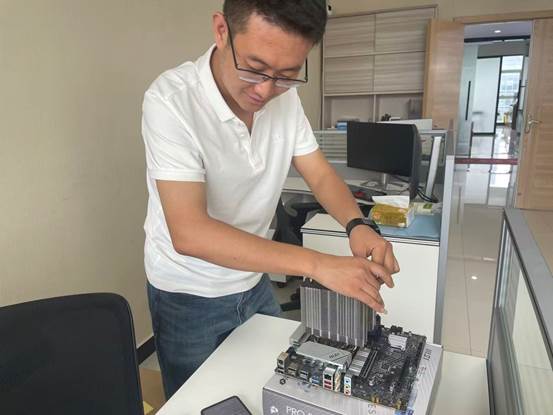
Figure 1: Assembly Process of the New Office Workstation (CPU Cooler Installation)
To balance the needs of website development, AI tool applications, and daily office work, we chose to purchase the components ourselves and complete the assembly.
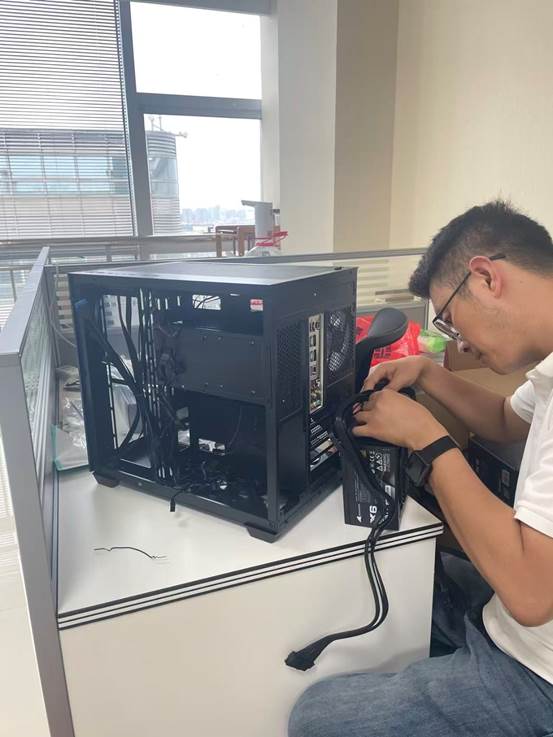
Figure 2. Workstation Assembly Process (Power Supply and Internal Cable Management)
During the assembly process, we paid particular attention to power supply stability and ease of future maintenance.
Since our daily work involves:
- Website development
- Graphic design
- AI tool applications
- Communication with international clients
- Product sourcing
- Daily office management
Therefore, we paid more attention to long-term stability, work efficiency, and future upgrade potential rather than simply the initial procurement cost. From determining the requirements to officially putting the workstation into use, the entire process took 3 days. Since only one additional office computer was added this time, the overall budget was approximately RMB 8,000, and the actual cost was RMB 8,116.
After multiple rounds of comparison and planning, we ultimately chose to purchase the components ourselves and assemble a workstation that met our actual business needs.
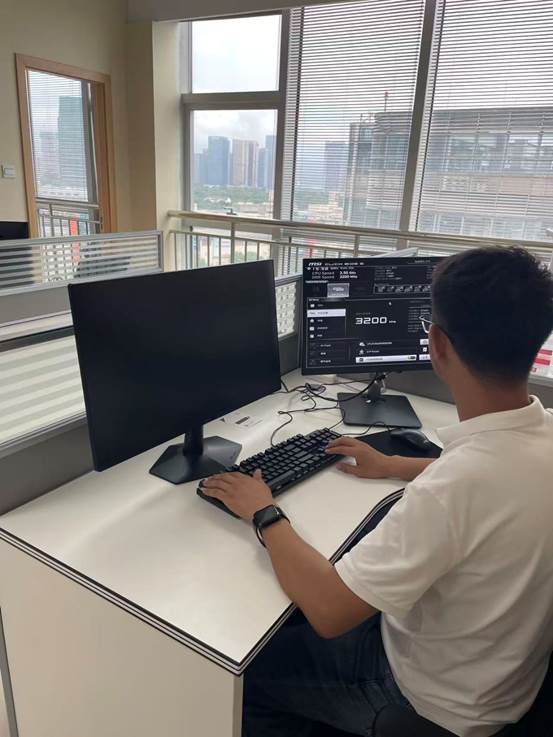
Figure 3. First Boot Testing and System Deployment
After completing the hardware installation, we performed BIOS configuration and memory performance tuning, and then prepared to deploy the office environment.
The main reasons were:
- Higher performance under the same budget
- Greater room for future upgrades
- Better suited for website development and AI tool applications
- More flexible dual-monitor office setup
Our Office Configuration
| Item | Configuration |
| Primary Use | Website development, AI tool applications, basic design, daily office work |
| Processor | Intel Core i5-14600KF |
| Memory | 32GB DDR4 |
| SSD | Kingston NVMe SSD 1TB |
| Graphics Card | ASUS RTX 3060 12GB |
| Monitor | Dual-monitor office environment |
It should be noted that this is not a standard configuration suitable for every company.
This configuration was selected based on our actual work requirements and future planning.
For trading companies, administrative positions, or basic office teams, such a configuration level is generally unnecessary to meet daily work requirements.
The following is the actual procurement list and cost details for this newly added workstation:
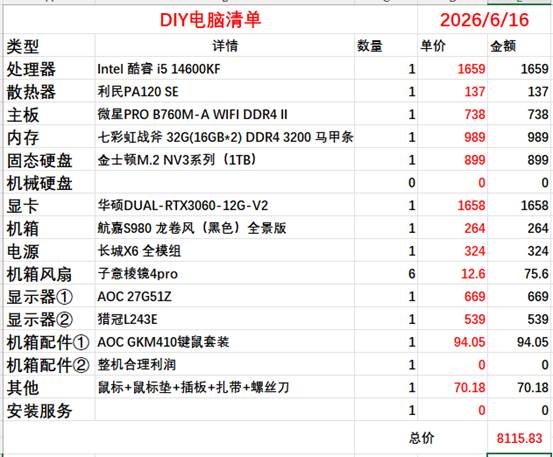
Figure 4. Actual Procurement List for the New Office Workstation in 2026 (Total Cost: RMB 8,116)
The image shows the actual procurement record and is provided for budget reference only. Prices may vary depending on the time, brand, and market conditions.
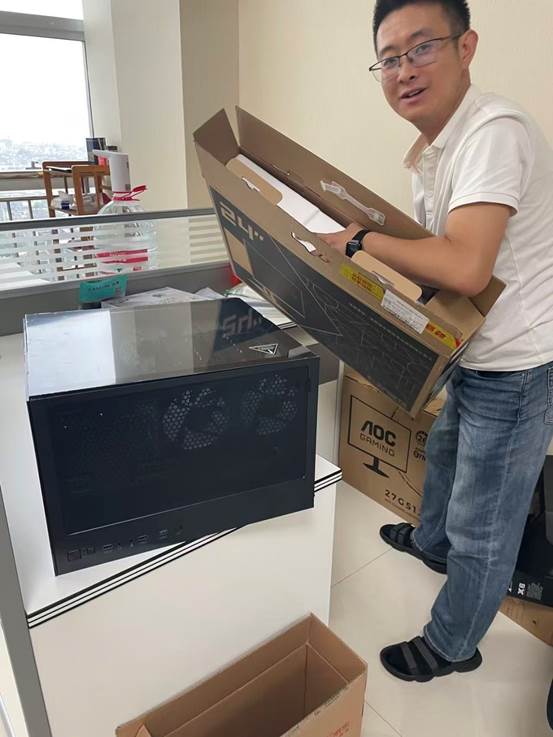
Figure 5. Dual-Monitor Office Environment Setup Process
In addition to the workstation itself, we also planned a dual-monitor office environment to improve daily work efficiency.
Why Did We Choose a Dual-Monitor Office Setup?
Compared with simply improving hardware performance, we believe that a dual-monitor setup provides a more noticeable improvement in work efficiency.
In our daily work, we often need to handle the following simultaneously:
- Client communication
- Website development
- AI tool applications
- Product information organization
- Data inquiry and analysis
A dual-monitor setup reduces the time spent switching between windows and improves multitasking efficiency.
For example:
- One screen is used for client communication and email processing;
- The other screen is used for development, design, or information research.
For website development, e-commerce operations, design work, and foreign trade business, a dual-monitor office setup often brings a more intuitive improvement in work efficiency.
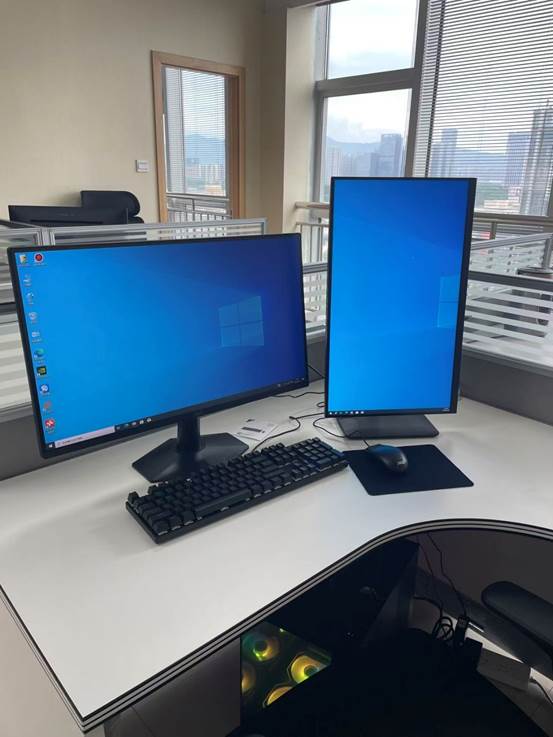
Figure 6. Final Result of the New Office Workstation (Dual-Monitor Office Environment)
After completing the system deployment, the workstation was officially put into use, mainly for website development, AI tool applications, client communication, and daily office management.
What Did We Learn from This Office Setup?
Looking back at the entire procurement and deployment process, our biggest takeaway was:
An office computer does not necessarily have to be the most expensive configuration—it should be the configuration that best fits your business needs.
For most companies:
- A reasonable configuration is more important than the highest configuration.
- Stability is more important than benchmark scores.
- Work efficiency is more important than hardware specifications.
- Planning ahead is more important than frequent upgrades later.
- Overall cost of ownership is more important than the purchase price.
The goal of office equipment has never been to pursue specifications, but to help the team complete work more efficiently.
Why Did We Compile This Procurement Guide?
During the office setup process, we found that many international clients entering the Chinese market encounter similar questions:
- They do not know what configuration they should choose.
- They are unsure how much budget they should prepare.
- They do not know where it is more appropriate to purchase equipment.
- They are uncertain how long it will take before they can officially begin office operations.
- They do not know who they should contact for assistance when problems occur.
This is also the reason why we compiled this "Yiwu Office Computer Procurement Guide."
We hope that by sharing our actual experience, we can help more companies avoid unnecessary detours and complete office setup and office environment deployment more quickly.
Frequently Asked Questions (FAQ)
1. When setting up a new office in Yiwu, how much budget should I typically prepare for an office computer?
The budget for office computers varies depending on the type of business, configuration requirements, and procurement method. For most basic office teams, the budget for a new computer is typically around RMB 4,000–5,500. For trading companies, cross-border e-commerce teams, development teams, or design positions, it is recommended to increase the budget according to actual business needs. In addition to the computer itself, you should also consider the costs of monitors, office software, network equipment, and other office-related equipment.
2. Should I buy a new computer or a used business computer?
There is no absolutely correct answer. The key depends on the company's stage of development and business needs.
If the company has just been established, has a limited budget, and mainly uses computers for Microsoft Office work, email communication, and web browsing, professionally tested enterprise-grade used business computers can usually meet the requirements.
If the company is involved in website development, e-commerce operations, design, video production, or AI tool applications, and plans to maintain long-term office operations, new computers can usually provide better performance, a longer service life, and more comprehensive after-sales support.
3. Where can I buy office computers in Yiwu?
The common procurement methods currently used by companies include local computer stores, JD.com (Jingdong), Taobao, enterprise-grade used business computers, and professional IT service providers.
Different channels each have their own advantages in terms of pricing, delivery speed, after-sales support, and ongoing maintenance. It is recommended that companies first determine their business needs and configuration plan, and then choose the procurement method that best matches their budget and service requirements.
4. How long does it usually take from purchasing office computers to officially starting office operations?
If the configuration plan has already been determined, most offices can complete computer procurement, operating system installation, network configuration, and office environment deployment within 1–5 business days.
The actual time mainly depends on the procurement channel, equipment availability, and whether printers, business email, office software, and the network environment also need to be configured simultaneously.
5. If I don't understand computers, can someone assist with the entire procurement and deployment process?
Yes.
For international companies that do not have dedicated IT staff or have just entered the Chinese market, professional IT service teams can usually assist with requirements planning, equipment procurement, operating system installation, office software deployment, network configuration, printer connection, and ongoing technical support, helping companies establish a stable and efficient office environment more quickly.
6. What type of office computer configuration should a foreign trade company choose?
For most foreign trade companies, an Intel Core i5 (or an equivalent AMD Ryzen 5) + 16GB memory + 1TB SSD is already sufficient for daily office work, including Google, WhatsApp, Excel, AI translation tools, multiple browsers, and multi-account operations.
If the team plans to use AI tools extensively, perform multitasking, or expand the business in the future, it is recommended to directly choose a 32GB memory configuration to obtain a smoother and longer-lasting user experience.
7. Is a dual-monitor office setup really worthwhile?
For teams that frequently handle client communication, website development, e-commerce operations, design work, or document organization, a dual-monitor office setup can usually significantly improve multitasking efficiency.
Compared with simply upgrading computer hardware, properly planning a dual-monitor office environment often brings a more noticeable improvement in work efficiency in many practical work scenarios.
8. Besides office computers, what other IT environment should typically be prepared when setting up a new office in Yiwu?
Office computers are only one part of the office IT environment.
Companies usually also need to plan broadband Internet, Wi-Fi, business email, Microsoft 365 or Google Workspace, printers, video conferencing equipment, data backup solutions, and employee office accounts.
Planning these IT environments together in advance can not only reduce repeated procurement and adjustment costs later but also help the office enter normal operations more quickly after it is put into use.
One-Minute Quick Review
If you don't have time to read the entire article, remember the following key points:
- Choosing the computer configuration based on business needs is more important than simply pursuing hardware specifications.
- It is recommended to plan the office computer budget based on your business development over the next 3–5 years, reducing the overall cost caused by frequent upgrades later.
- For most foreign trade companies, 16GB memory is usually sufficient for daily office work; for teams involved in development, design, e-commerce operations, or AI applications, 32GB memory or above is recommended.
- Office computers are only one part of the office IT environment. The network, business email, office software, printing equipment, and data backup are equally worth planning in advance.
- Once the configuration plan has been determined, most offices in Yiwu can complete office computer procurement and IT deployment within 1–5 business days.
- If the company does not have dedicated IT staff, seeking professional assistance can usually save more time, reduce communication costs, and help the office begin normal operations more quickly.
One Final Suggestion
For many companies entering the Yiwu market, computer procurement is only one part of the office setup process.
What truly matters is not which computer you purchase, but establishing a stable, secure office environment that supports business development as quickly as possible within a reasonable budget.
From computers and networks to business email, printing equipment, and collaboration tools, planning ahead is often more time- and cost-efficient than making continuous adjustments later.
Our goal is not to sell computer equipment, but to help companies complete office setup more quickly so that their teams can begin working immediately after moving into the office and devote more energy to customer development and business growth.
Related Links:
- 10 steps from registering a WFOE trading company to get working visa in Yiwu, China.
- How to give a good name to your company in China?
- How to rent an office to use as registration address for your company in Yiwu city, China?
- How to register a trading company in Yiwu, China?
- Costs for having a WFOE company in Yiwu City, China for 1 year, with 2 working permits/visas/shareholders.
- Common mistakes when renting office for company registration in Yiwu, China.
- How to get Alipay and Wechat pay as a short-term visitor (visa within 30 days)?
- How to start a new Import and Export trading business in Yiwu, FAST?
- How to extend M visa in Yiwu China before it expires?
- How to prepare the interview for M visa extension (renew) in Yiwu, China?
- Set up new office / company in Yiwu, China: Where and How to buy office computers? (2026 Guide)
- From Company Registration to 50+ Containers: A Real Story of Two African Entrepreneurs Starting a Business in Yiwu, China.
Contact Us:
*You can either email us at: YiwuMarketGuide@gmail.com;
Or leave us a message via below contact form;
Or WhatsApp us by the code at bottom of this page, or via mobile phone number +86 159 2428 6660, from 9am to 5pm(China time);
Or visit us at: Room 1220, Floor 12, Hengfeng Plaza (恒风大厦), 628 Chengxin Avn (诚信大道628号), Yiwu City, Zhejiang Province, China.
Call us when Urgent:
Phone/WhatsApp/WeChat: +86-15924286660
( 9:00 - 17:00, Working Days )
 Scan this code to Ask Jack on WhatsApp
 Scan this QR code to add Jack Yang on WeChat
Ever Used Jack's Service?
Love it or hate it, why not share it?

>> Back to Yiwu China
>> Back to homepage.
Recent Articles


-
Both the rides are great.
Oct 27, 26 10:53 PM
 Thks for the arrangement. Both the rides are great.
 -
Is Yiwu Market Open During China's National Day Holiday?
Oct 13, 26 09:28 PM
 Is Yiwu Market open during China's National Day holiday? Follow our guide to learn about supplier availability, buy samples, opening hours, and sourcing tips.
 -
Two Days in Keqiao: Discovering China's Fabric Industry
Sep 29, 26 12:45 AM
 Follow our guide to discover China's fabric industry in two days.
Market Broadcast:
Feb.13 - 28, Yiwu market fully closed for Chinese New Year Holiday (Lunar New Year) 2026.